
Court exhibits
Bates numbering for PDF documents
Bates numbers give every page of a document set a unique, sequential identifier. With PageDream PDF you apply Bates numbers with a prefix, start number, number of digits and position, optionally consecutively across multiple files and together with exhibit stamps. Processing takes place locally on your computer.
Free without signing in. Try Pro for 14 days with a free account. For Windows; a macOS version is in preparation.
A Bates number usually consists of a prefix, for example an abbreviation for the party or the matter, and a sequential number with a fixed number of digits, such as PLTF000001. Each page receives exactly one number, and the count runs across all documents in a set. This allows every page to be identified unambiguously in briefs, indexes and at trial or hearing.
Bates numbering originates in US litigation practice, where large document sets are exchanged in discovery. It is also used in arbitration, in complex civil proceedings and when exhibits are submitted, because it allows page references independent of how documents are split into files. For exhibits under Austrian or German practice, see also creating a court exhibit index.
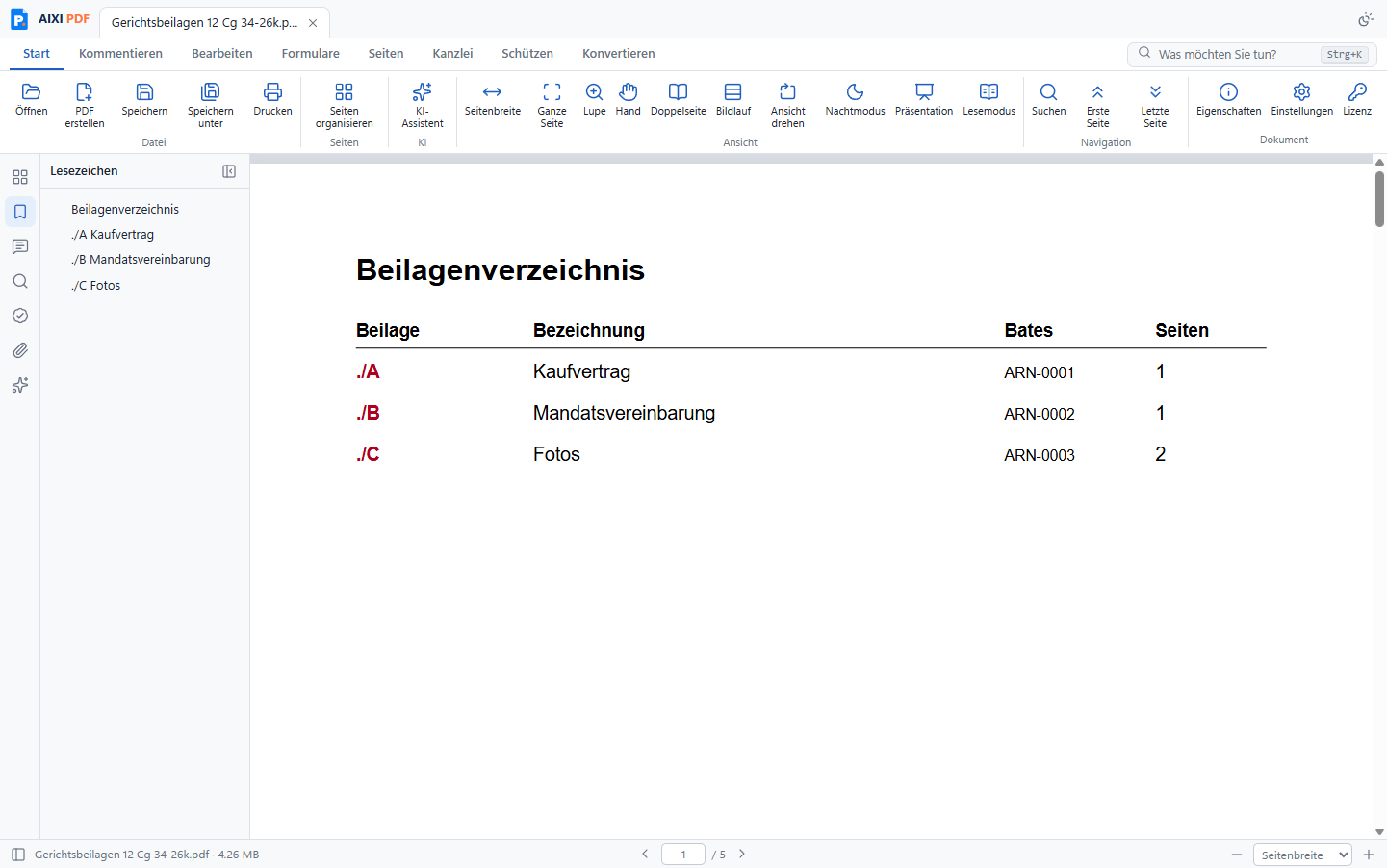
How to apply Bates numbers in PageDream PDF
- Set the prefix Enter the prefix, for example an abbreviation for the party, the client matter or the case. It appears before every number.
- Choose start number and digits Specify the first number and the number of digits. Leading zeros ensure a uniform length, for example 000001. If you are continuing an earlier production, start with the next available number.
- Choose the position Choose where on the page the number appears so that it covers neither text nor an exhibit stamp.
- Number multiple files consecutively In batch processing you apply consecutive Bates numbers across all PDF files in a folder. The results are written to a target folder; the originals remain unchanged.
- Combine with exhibit stamps When creating court exhibits, every page of the new exhibits can receive a consecutive Bates number in addition to the exhibit stamp; the exhibit index states the first Bates number of each exhibit.
What Bates numbers are used for in a law firm
In large productions, briefs, expert reports and transcripts refer to individual pages. A Bates number stays the same even when documents are reassembled, split or produced in a different order. The court, opposing counsel and experts can therefore find the cited page without further enquiry.
Bates numbers also document which pages were produced. Missing or duplicate numbers become apparent, and when a production is later supplemented the count continues from the last number assigned. When an exhibit index created with PageDream PDF is continued, exhibits already submitted keep their Bates numbers.
Confidential information can be redacted before production. Before electronic filing, PageDream PDF checks the file against the technical requirements for beA or US federal courts; see the pre-filing check.
Production, exhibits and exhibit lists
In US practice, documents are delivered to the opposing party in discovery as a production; every page bears a Bates number, and the number ranges are stated in cover letters and indexes. Exhibits for trial, hearings or briefs are listed in an exhibit list. PageDream PDF provides the numbering, the stamps and the index; which form a court or an agreement between the parties requires must be checked in each case.
Frequently asked questions
What is a Bates number?
A unique, sequential identifier for every page of a document set, usually consisting of a prefix and a number with a fixed number of digits, such as PLTF000001. It allows references to individual pages regardless of the file in which the page is contained.
Can I number consecutively across multiple files?
Yes. Batch processing applies consecutive Bates numbers across all PDF files in a folder and writes the results to a target folder. The originals remain unchanged.
Can Bates numbers be combined with exhibit stamps?
Yes. When creating court exhibits, every page of the new exhibits can receive a consecutive Bates number in addition to the exhibit stamp; the first Bates number of each exhibit appears in the exhibit index.
Can I continue an earlier production?
Yes. Enter the next available number as the start number. When an exhibit index created with PageDream PDF is continued, exhibits already submitted keep their Bates numbers; only the new exhibits receive new numbers.
Is Bates numbering included in the free version?
No. Bates numbers, like court exhibits and exhibit stamps, are reserved for the Pro licence. With a free account on pagedream.io you can try Pro with all features for 14 days, without payment details and without a subscription. Details are on the pricing page, and the program is available from the download page.
Try Bates numbering with PageDream PDF
Try Bates numbers, exhibit stamps and exhibit indexes with Pro and all features for 14 days, with a free account and without payment details.